Tunnel Vision: Breaking Microsoft Global Secure Access — Part 2
Under the Hood
In Part 1 we walked through what Global Secure Access is: Microsoft's Security Service Edge offering, an identity-anchored VPN replacement built from a kernel driver that intercepts network traffic and a gRPC tunnel to Microsoft's cloud edge.
This is the per-flow decision logic I called out in Part 1. Everything here is the result of a month of reverse engineering and the understanding of GSA's internals I built up while figuring out how this product works. For each function that matters, I show the decompiled code, translate it to readable pseudocode, and give the exact address so you can verify it yourself.
Fair warning: this is the technical part of the series, and I've kept it at full depth. If you came for the attack, that's Part 3. This post is the map you need before the attack makes any sense.
How I went about it
The GSA Windows client is not one binary. It's six user-mode executables and one kernel driver (I listed them in Part 1). Together that's north of 100,000 functions. The tunneling service alone is a 14 MB binary with roughly 33,800 of them. You do not read that by scrolling.
So the approach was the usual one for a binary this size: let the strings tell you where the interesting code lives, decompile those functions, rename them as their behaviour becomes clear, and follow the cross-references outward.
The kernel driver: NDIS LWF + WFP
GlobalSecureAccessDriver.sys is small, about 218 KB, 711 functions and the most important binary in the whole client, because it decides, for every outbound connection on the machine, whether GSA cares about it.
In Part 1 I claimed two things about this driver: that it's a lightweight filter (LWF) rather than a virtual adapter, and that it makes per-flow decisions in the kernel. The import table settles both (trimmed to the interesting half):
; NDIS lightweight filter
NdisFRegisterFilterDriver        NdisFDeregisterFilterDriver
NdisFSendNetBufferLists          NdisFSendNetBufferListsComplete
NdisFIndicateReceiveNetBufferLists   NdisFReturnNetBufferLists

; Windows Filtering Platform
FwpsCalloutRegister1             FwpmCalloutAdd0
FwpmProviderAdd0                 FwpmSubLayerAdd0          FwpmFilterAdd0
FwpsPendClassify0                FwpsRedirectHandleCreate0
FwpsQueryConnectionRedirectState0

; ALPC (kernel <-> user IPC)
ZwAlpcCreatePort                 ZwAlpcAcceptConnectPort
ZwAlpcSendWaitReceivePort
NdisFRegisterFilterDriver is the giveaway: the driver registers as an NDIS lightweight filter, exactly the "sit in the stack and pick off flows" design I described. And FwpsCalloutRegister1 + FwpmFilterAdd0 mean it also plugs into the Windows Filtering Platform. GSA uses both: WFP to make the decision about a new connection, NDIS to move the packets once a flow is tunneled. So simply said WFP decides and NDIS carries.
Registering the callout
The decision point is a WFP callout at the ALE_CONNECT_REDIRECT layer, the layer Windows fires when a socket is about to connect, and the one place you can redirect a connection before it leaves the box. The constructor that wires it up lives at 0x14001161c:
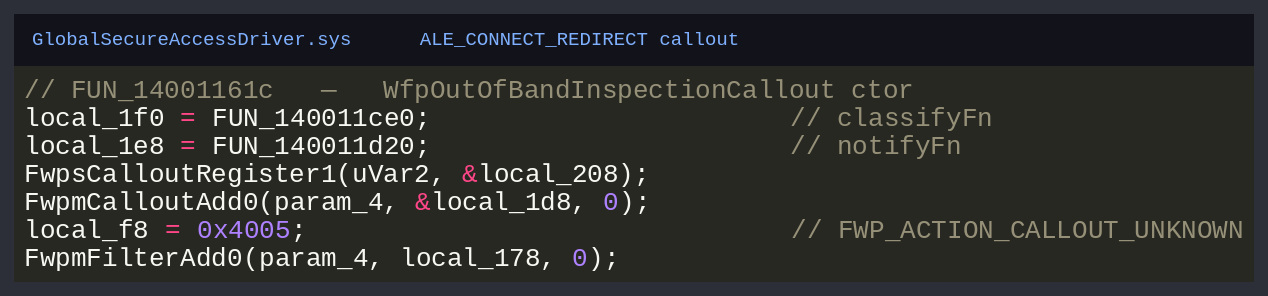
Cleaned up, the registration looks like this:
FwpsCalloutRegister1(device, calloutKey, WfpClassifyCallback, WfpNotifyCallback);
FwpmProviderAdd0(engine, "Microsoft NaaS Platform");
FwpmSubLayerAdd0(engine, gsaSubLayer);
FwpmCalloutAdd0(engine, calloutKey);
FwpmFilterAdd0(engine, FWPM_LAYER_ALE_CONNECT_REDIRECT_V4, FWP_ACTION_CALLOUT_UNKNOWN);
// same again for _V6
Two load-bearing details:
- The filter action is
0x4005,FWP_ACTION_CALLOUT_UNKNOWN: "don't permit or block yourself, call my code and let it decide." That's what hands every new connection to GSA. - There are two registrations, V4 and V6 (you can see two layer-GUID comparisons in the constructor). GSA inspects IPv6 as well as IPv4, worth knowing, since "we only thought about v4" is a classic place these things fall over.
The classify callback
The classifyFn is a thunk that jumps straight into the real logic:
// FUN_140011ce0: WfpClassifyCallback
void WfpClassifyCallback(/* WFP args */) {
    WfpClassifyImplementation(filter->context + 0x10, /* WFP args */);
}
The work is in WfpClassifyImplementation at 0x1400170f8. Big function, simple shape once you read past the logging:
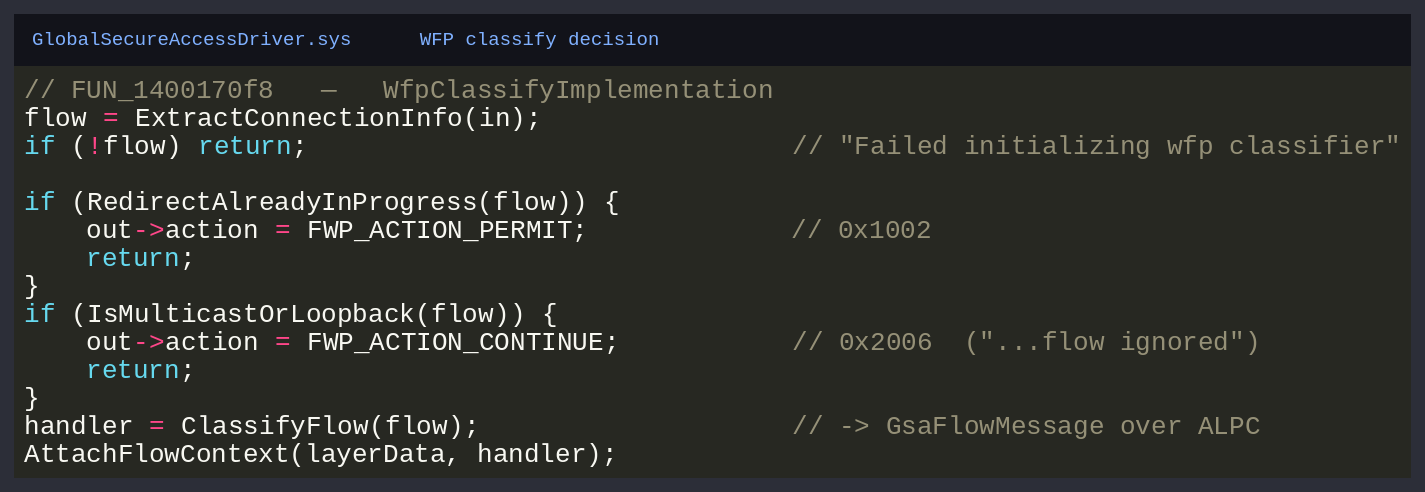
The WFP actions it writes back are the policy, so know them by sight:
| Value | Constant | Meaning for GSA |
|---|---|---|
0x1001 |
FWP_ACTION_BLOCK |
drop the connection |
0x1002 |
FWP_ACTION_PERMIT |
let it through untouched |
0x2006 |
FWP_ACTION_CONTINUE |
"not mine", fall through to the stack |
0x4005 |
FWP_ACTION_CALLOUT_UNKNOWN |
(the filter action) "ask the callout" |
The loopback/multicast shortcut
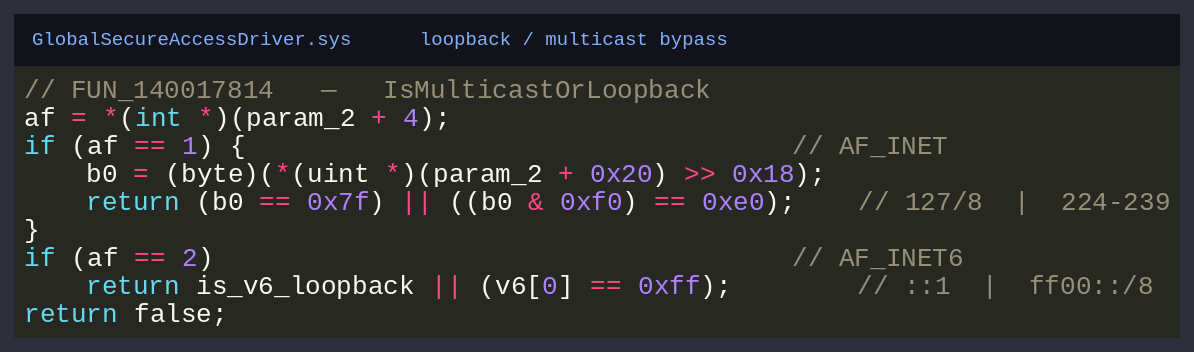
Before bothering any user-mode service, GSA discards traffic that could never be tunneled: loopback and multicast. It's a small, pure function, which makes it a great one to read from the binary. Here it is at 0x140017814:
bool IsMulticastOrLoopback(flow) {
    if (flow.family == AF_INET) {
        u8 b0 = flow.v4[0];
        return b0 == 0x7F || (b0 & 0xF0) == 0xE0;   // 127.0.0.0/8  |  224.0.0.0-239.255.255.255
    }
    if (flow.family == AF_INET6)
        return flow.v6 == ::1 || flow.v6[0] == 0xFF; // ::1  |  ff00::/8
    return false;
}
127.0.0.0/8, the class-D 224–239 multicast range, IPv6 ::1 and ff00::/8. If it matches, GSA writes FWP_ACTION_CONTINUE and steps aside. Everything else gets classified.
Classifying a flow → the FlowHandler
A connection that survives the bypass becomes a per-flow object, a FlowHandler, built by ClassifyFlow at 0x140016f2c. It picks an object size by flow type (0xb0/0xf0/0x148/0xa0), zeroes it, and constructs it:
// FUN_140016f2c: ClassifyFlow
if (IsConnectRedirectFlow(flow)) {
    h = Alloc(0xF0);
    return ConstructRedirectFlowHandler(h, flow);   // will message user mode
}
if (IsDnsFlow(flow)) {
    h = Alloc(0x148);
    return ConstructDnsFlowHandler(h, flow);
}
To get the verdict ("should this flow be tunneled?"), the driver hands the flow to user mode over ALPC.
Injecting packets back: NDIS
Once a flow is tunneled, packets have to get back into the stack: inbound from the tunnel (RX) and re-emitted outbound (TX). That's the NDIS half. The inject routine at 0x140014ec0 is blunt about direction:
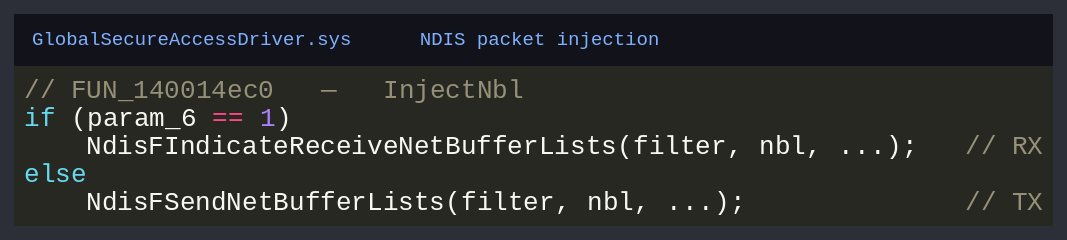
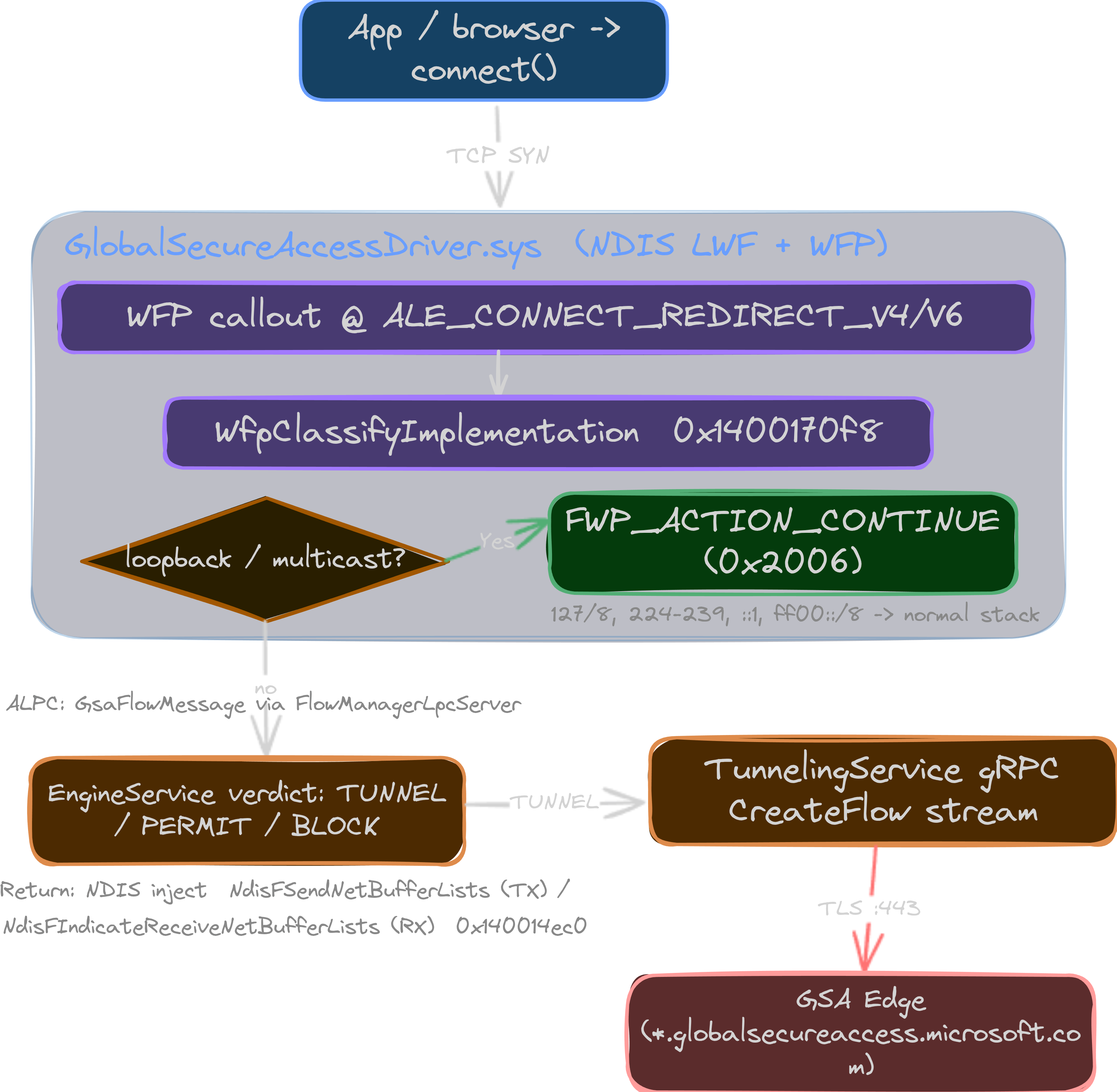
WFP catches the connection at ALE_CONNECT_REDIRECT, WfpClassifyImplementation drops the noise and classifies the rest, a FlowHandler is built, the verdict comes from user mode over ALPC, and tunneled traffic moves through NDIS. Let's look at that ALPC seam. Seams are where I look first.
ALPC: the kernel ↔ user-mode seam
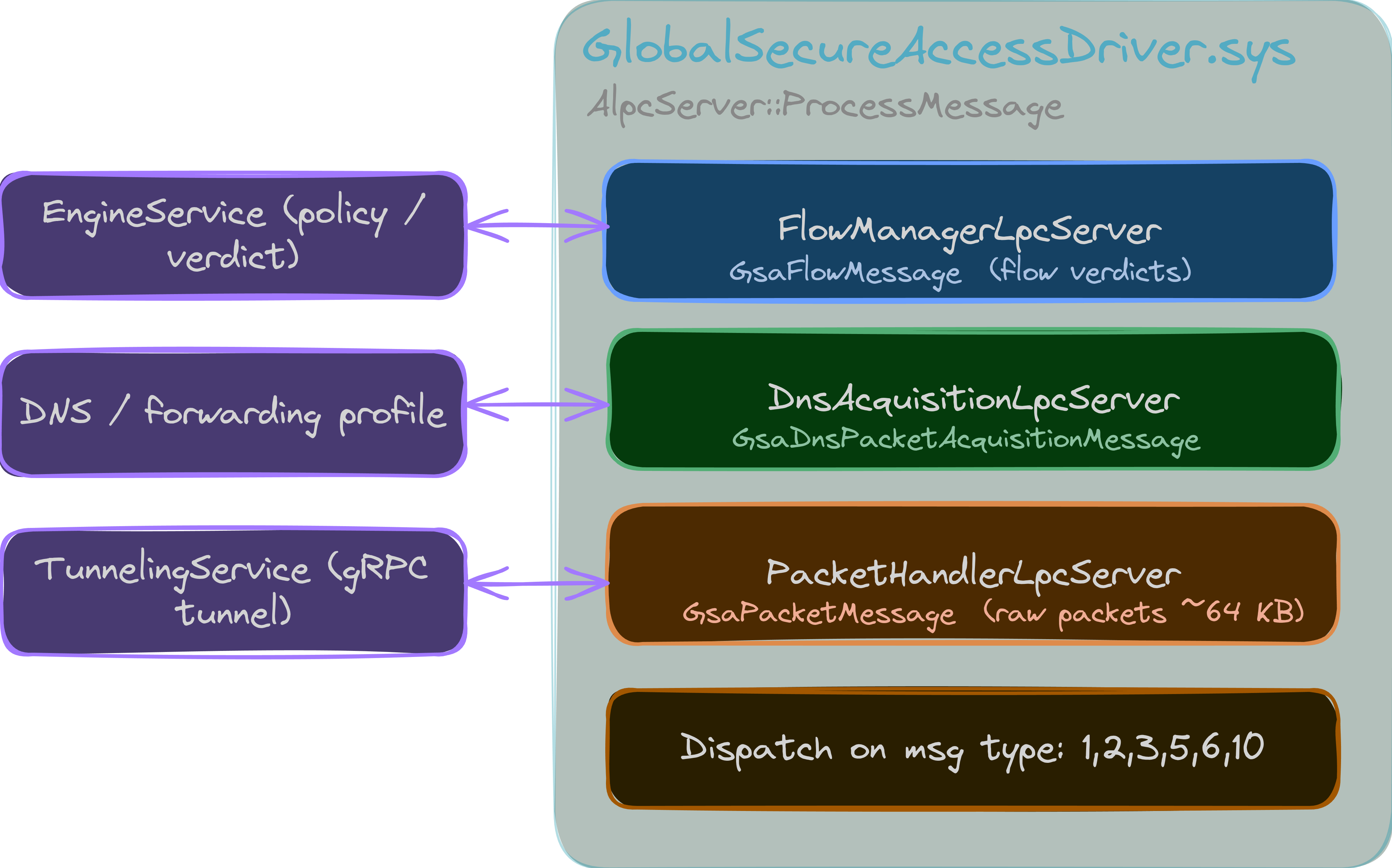
The driver can't make policy on its own. Forwarding profiles, app rules, FQDN/IP matching all live in user mode in GlobalSecureAccessEngineService.exe. The two halves talk over ALPC, the fast kernel IPC mechanism RPC uses underneath.
The driver creates its ports with ZwAlpcCreatePort / ZwAlpcAcceptConnectPort, and the port names are right there in the string table:
\GlobalSecureAccessFlowManagerLpcServer        <- struct GsaFlowMessage
\GlobalSecureAccessDnsAcquisitionLpcServer     <- struct GsaDnsPacketAcquisitionMessage
\GlobalSecureAccessPacketHandlerLpcServer      <- struct GsaPacketMessage
Each port is a templated Mnap::Common::MnapAlpcServerWrapper<struct Gsa...Message>, so the three named ports map to three message types:
- FlowManager:
GsaFlowMessage, the "should I tunnel this flow?" question and its TUNNEL/PERMIT/BLOCK answer. - DnsAcquisition:
GsaDnsPacketAcquisitionMessage, DNS interception (the machinery behind the synthetic6.6.x.xIPs from Part 1). - PacketHandler:
GsaPacketMessage, raw packets, the bulk data path.
Every inbound message lands in one dispatcher, AlpcServer::ProcessMessage at 0x14000e6b0, a clean switch on a single type byte:
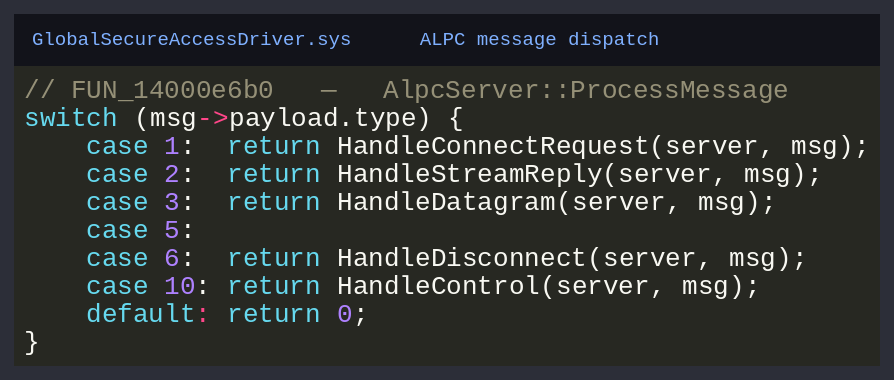
Two notes that come back in Part 3. The maximum message the driver accepts is 0xFC3E (64,574 bytes), right against ALPC's ~64 KB ceiling, because whole packets ride these messages. And the attack-surface instinct fires immediately: a kernel driver parsing structured, attacker-influenceable messages off a named port is exactly the kind of thing you poke at. More on that later.
The verdict itself is computed on the user-mode side, in EngineService, where the flow setup and bypass checks run before a decision is dispatched back:
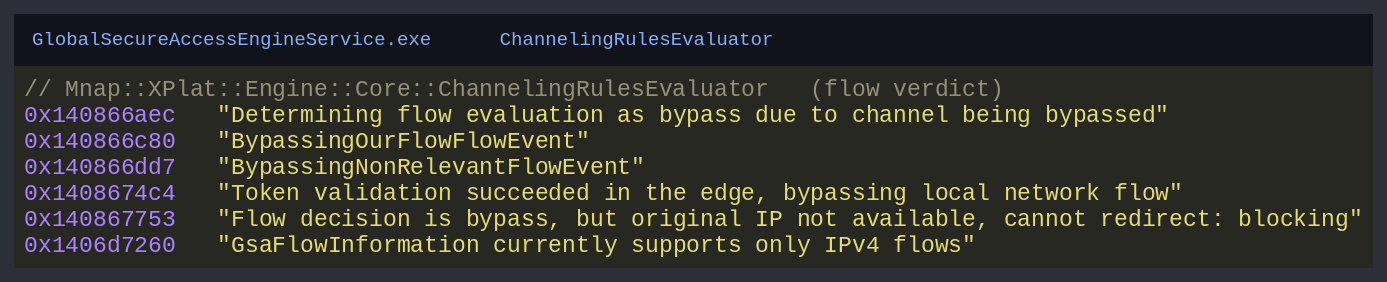
The takeaway is the architecture: kernel WFP decision → GsaFlowMessage over the FlowManager port → user-mode verdict → tunnel. Which brings us to the tunnel.
The tunnel: gRPC, and a protocol I had to rebuild
Here GSA stops looking like a VPN and starts looking like a cloud microservice, because that's what it is. GlobalSecureAccessTunnelingService.exe speaks gRPC over HTTP/2 with TLS to Microsoft's edge. No custom framing, no odd ports. From the network it's an outbound HTTPS connection and nothing more.
I established the gRPC stack three independent ways:
- The build paths point at vcpkg's static
grpcpp. - The runtime strings are pure gRPC:
GRPC_CHANNEL_READY,GRPC_CHANNEL_TRANSIENT_FAILURE, optionsgrpc.keepalive_time_ms,grpc.keepalive_permit_without_calls,grpc.channel_id, and a very on-the-nose"Failed to create grpc channel because the creation of control channel failed due to timeout". - The service method paths are embedded string constants:
/microsoft.ztna.v2.Ztna/CreateControlChannel        @ 0x140a50c60
/microsoft.ztna.v2.Ztna/CreateFlow                  @ 0x140a50c90
And the edge it dials:
https://aps.globalsecureaccess.microsoft.com/api/v3/AgentSettings
So the entire RPC surface is two methods, both bidirectional streaming:
CreateControlChannel(stream ClientControlMessage) → stream ServerControlMessage, the long-lived control plane: create the tunnel, authenticate it, step-up, keepalive.CreateFlow(stream ClientFlowMessage) → stream ServerFlowMessage, one stream per tunneled connection, raw IP packets both ways.
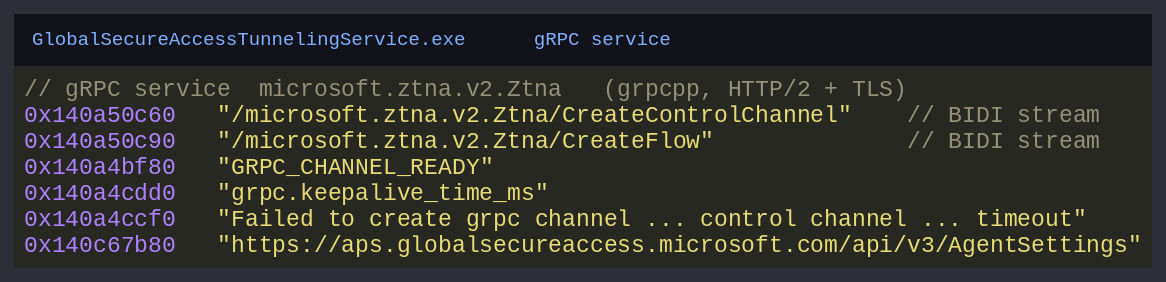
Two methods. That's the whole tunnel. Now I just had to know what flowed through them, which meant rebuilding the .proto.
Reverse-engineering the protobuf
This was my favourite part, so let me show the technique, because it works on any C++ binary that uses protobuf.
When you compile a .proto with the C++ protobuf compiler, the generated code embeds a serialized FileDescriptorProto (a complete description of every message, field, type and field number), so reflection and the descriptor pool work at runtime. That descriptor doesn't get stripped. It's sitting in .rdata in a recognisable shape. So you don't guess the schema from serialization code; large chunks of it are right there to read.
Search the string table for microsoft.ztna and the descriptor lights up:
Protos/ztna_v2.proto
2&.microsoft.ztna.v2.CreateTunnelMessageH
2-.microsoft.ztna.v2.CreateTunnelNoTokenMessageH
2..microsoft.ztna.v2.TunnelAuthenticationRequestH
2'.microsoft.ztna.v2.TunnelCreatedMessageH
microsoft.ztna.v2.ClientFlowMetadata.destination_ip
microsoft.ztna.v2.ClientFlowMetadata.app_token
microsoft.ztna.v2.ClientDeviceInfo.client_device_id
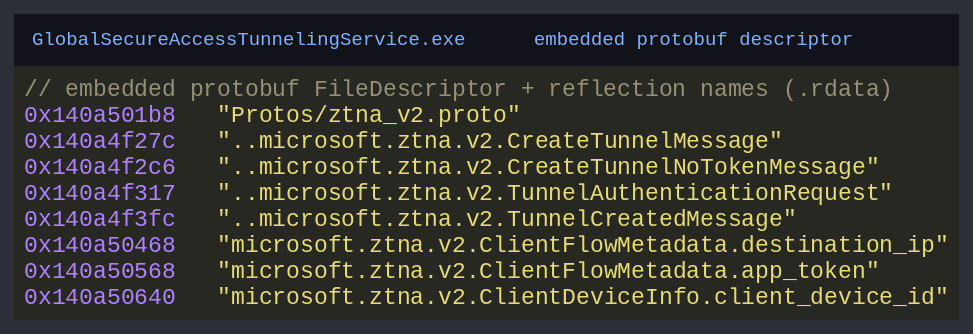
Those aren't my labels. That's the embedded descriptor and the per-field reflection names. Protos/ztna_v2.proto is literally the original source filename. The little 2&. / 2-. prefixes are protobuf wire bytes from the descriptor's own encoding: the oneof member list of the control message, byte for byte.
To turn fragments into a schema, I cross-checked the descriptor against the serializer functions, which name their fields too. Here's CreateTunnelMessage's serializer at 0x140195170:
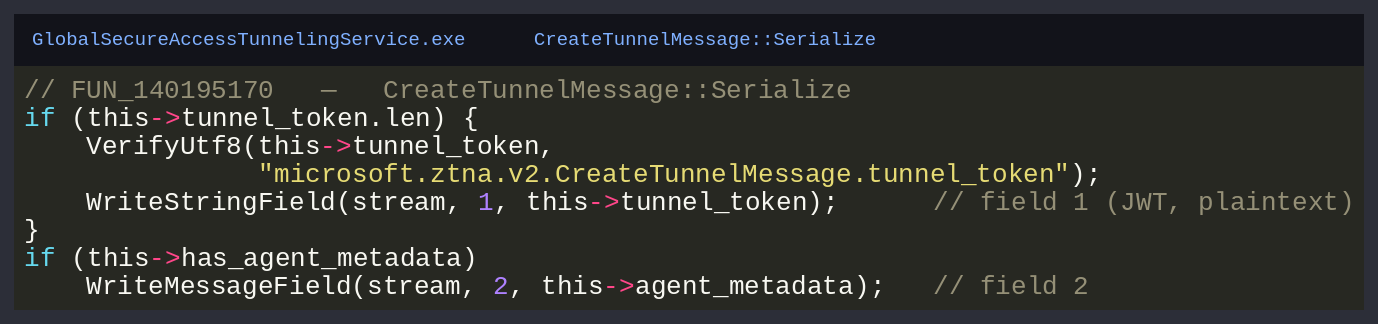
That nails it: CreateTunnelMessage is field 1 tunnel_token (string), field 2 agent_metadata (message). And note the thing that matters most for Part 3: tunnel_token is written as a plain UTF-8 string. The JWT goes on the wire as a protobuf string field, with nothing but the transport TLS around it. Hold that thought.
Done across the serializers and the descriptor, the schema falls out. Here's the reconstructed ztna_v2.proto, every message of which I corroborated against the binary's own descriptor and serializer code:
syntax = "proto3";
package microsoft.ztna.v2;

enum ConnectionProtocol { UNDEFINED = 0; IP = 3; TCP = 6; UDP = 17; }
enum TrafficProfile     { PROFILE_UNDEFINED = 0; INTERNET = 1; PRIVATE_ACCESS = 2; M365 = 3; }
enum DeviceJoinType     { DEVICE_JOIN_NONE = 0; MICROSOFT_ENTRA_JOINED = 1; MICROSOFT_ENTRA_REGISTERED = 2; }
enum CloseReason        { CLOSE_REASON_UNKNOWN = 0; CLOSE_REASON_TOKEN_EXPIRED = 1; }

message ClientDeviceInfo {            // all client-supplied strings
    string client_agent_version   = 1;
    string client_os_type         = 2;
    string client_os_version      = 3;
    string client_device_id       = 4;
    string client_os_name         = 5;
    ClientPolicyMetadata client_policy_metadata = 6;
    string client_device_name     = 7;
    string client_os_architecture = 8;
    DeviceJoinType client_device_join_type = 9;
}

message ClientFlowMetadata {
    string correlation_id = 1;  string tunnel_id = 2;
    string destination_ip = 3;  string destination_host = 4;
    int32  destination_port = 5; string client_resolved_ips = 6;
    string client_invoked_process_name = 7;
    string app_token = 8;        ConnectionProtocol protocol = 9;
}

message CreateTunnelMessage         { string tunnel_token = 1; ClientDeviceInfo agent_metadata = 2; }
message CreateTunnelNoTokenMessage  { ClientDeviceInfo agent_metadata = 1; }     // tokenless variant
message TunnelAuthenticationRequest { string tunnel_token = 1; }
message FlowAuthenticationRequest   { ClientFlowMetadata metadata = 1; }
message TunnelCreatedMessage        { string tunnel_id = 1; string claim_challenge = 2;
                                      string azure_region_display_name = 3; string server_geo_location = 4; }
message TunnelAuthenticationRequired { string claim_challenge = 1; }

message ClientControlMessage {
    string correlation_vector = 1;
    reserved 2 to 9;
    oneof payload {
        CreateTunnelMessage         create_tunnel               = 10;
        TunnelAuthenticationRequest authentication_request      = 11;
        CreateTunnelNoTokenMessage  create_tunnel_no_token      = 12;
        FlowAuthenticationRequest   flow_authentication_request = 13;
    }
}

message ServerControlMessage {
    string correlation_vector = 1;
    reserved 2 to 9;
    oneof payload {
        TunnelCreatedMessage                tunnel_created                         = 10;
        TunnelAuthenticationRequired        tunnel_authentication_required         = 11;
        TunnelAuthenticationSuccessResponse tunnel_authentication_success_response = 12;
        TunnelAuthenticationFailedResponse  tunnel_authentication_failed_response  = 13;
        TunnelClosedMessage                 tunnel_closed                          = 14;
        FlowClosedMessage                   flow_closed                            = 15;
        FlowAuthenticationSuccessResponse   flow_authentication_success            = 16;
        FlowAuthenticationFailureResponse   flow_authentication_failure            = 17;
    }
}

message ClientFlowMessage { ClientFlowMetadata metadata = 1; bytes packet = 2; }
message ServerFlowMessage { bytes packet = 1; }

service Ztna {
    rpc CreateControlChannel(stream ClientControlMessage) returns (stream ServerControlMessage);
    rpc CreateFlow(stream ClientFlowMessage) returns (stream ServerFlowMessage);
}
Feed that to protoc and you have working client stubs. The protocol stops being a binary and becomes an API. (What I did with that API is Part 3.)
Three things in this schema deserve a hard stare:
ClientDeviceInfois entirely client-supplied strings. Device ID, device name, OS, join type, all free text the client fills in. No certificate, no attestation, no TPM-bound proof anywhere in tunnel creation. The "device" the edge knows about is whatever the client says it is.CreateTunnelNoTokenMessageexists. There's a tokenless creation path in the protocol.ClientFlowMessage.packetisbytes. A raw IP packet. The flow stream is a software wire: hand it L3 packets, they come out the far end of Microsoft's network.
Authentication: three tokens and a handshake
Now the part everyone wants: how does the client prove who it is?
Before any tunnel exists, the client acquires Entra ID tokens through MSAL (it even spawns a dedicated authentication helper for the interactive flows). What shows up in the auth paths is a three-token model: three JWTs, each scoped to a different part of GSA:
- a tunnel token, authenticates the tunnel (the
tunnel_tokeninCreateTunnelMessage), - an APS/profile token, bearer auth to
aps.globalsecureaccess.microsoft.comto pull agent settings and the forwarding profile, - an app token, rides per-flow in
ClientFlowMetadata.app_token, tying a connection to an application.
All three are standard Entra JWTs, and all three live in the client's process memory and caches while it runs. (Where, and how you lift them, is Part 3.)
With tokens in hand, the handshake runs over CreateControlChannel. The happy path is short:
Client                                                 Edge
|                                                          |
|  CreateControlChannel()                                  |
|--------------------------------------------------------->|
|                                                          |
|  ClientControlMessage { create_tunnel:                   |
|    CreateTunnelMessage { tunnel_token, agent_metadata } }|
|--------------------------------------------------------->|
|                                                          |
|  ServerControlMessage { tunnel_created:                  |
|    TunnelCreatedMessage { tunnel_id, region, geo } }     |
|<---------------------------------------------------------|
If Conditional Access wants step-up, the server challenges instead of failing:
Client                                                 Edge
|                                                          |
|  ServerControlMessage { tunnel_authentication_required:  |
|    claim_challenge }                                     |
|<---------------------------------------------------------|
|                                                          |
 [ client re-acquires a token carrying the demanded claims ]
|                                                          |
|  ClientControlMessage { authentication_request:          |
|    TunnelAuthenticationRequest { tunnel_token } }        |
|--------------------------------------------------------->|
|                                                          |
|  ServerControlMessage { tunnel_authentication_success }  |
|<---------------------------------------------------------|
|                                                          |
|  ServerControlMessage { tunnel_created }                 |
|<---------------------------------------------------------|
That claim_challenge is how GSA reaches Conditional Access all the way into the tunnel handshake: the same step-up dance you've seen in browser auth, in protobuf.
Then, for every destination, there's a per-flow auth on the control channel before the data stream opens:
Client                                                 Edge
|                                                          |
|  ClientControlMessage { flow_authentication_request:     |
|    FlowAuthenticationRequest { metadata } }              |
|--------------------------------------------------------->|
|                                                          |
|  ServerControlMessage { flow_authentication_success }    |
|<---------------------------------------------------------|
|                                                          |
 [ open a new CreateFlow data stream for this destination ]
|                                                          |
|  CreateFlow()                                            |
|--------------------------------------------------------->|
|                                                          |
|  ClientFlowMessage { metadata }                          |
|--------------------------------------------------------->|
|                                                          |
|  ClientFlowMessage { packet: <raw IPv4> }                |
|--------------------------------------------------------->|
|                                                          |
   Edge --> Private Network Connector --> internal app
The whole sequence (token acquisition, transport, control channel, the step-up alt path, and per-connection flow auth) is the diagram below:
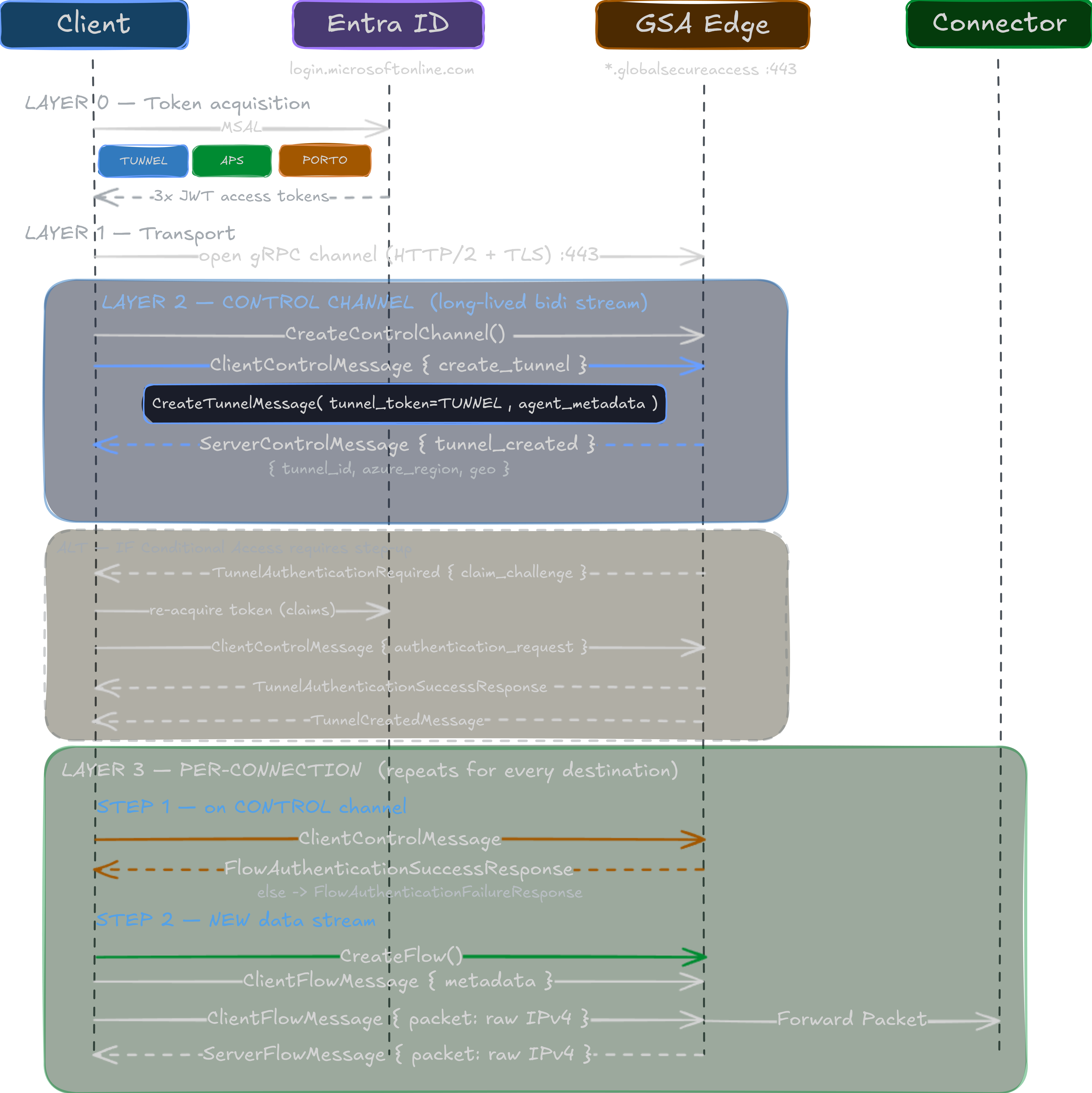
And here's the line the next post hangs on. Look at what authenticated the tunnel: a JWT, plus a bag of client-controlled strings describing a "device." That's it. The protocol has an optional client-certificate (mTLS) path (I found the handler) but it's gated behind a feature flag, and nothing in the core CreateTunnelMessage exchange requires cryptographic proof that you are a real, managed, compliant Windows machine. The boundary is the authentication plane (do you hold a valid token?), not the device plane (are you actually an enrolled device?).
If you read Part 1, you can feel where this goes. The "compliant network" promise, the device trust, the zero-trust pitch, they all assume the thing on the other end is the real GSA client on a real managed endpoint. The protocol doesn't check that. It checks for a token.
With nothing but extracted tokens and this reconstructed protocol, I stood up a tunnel from a Linux box: the edge accepted it, and I completed a full TCP three-way handshake to an internal SMB server (192.168.255.250:445) behind the victim tenant's connector from a machine that had no connection to the internal network. No managed device. No GSA client. Just a token and the protocol you just read.
That's Part 3.
Where this leaves us
Pulling it together, the GSA client is four moving parts in a trench coat:
- a WFP callout at
ALE_CONNECT_REDIRECTthat catches every outbound connection (WfpClassifyImplementation, with a tidy loopback/multicast bypass); - an NDIS lightweight filter that physically moves tunneled packets in and out of the stack;
- an ALPC bus (
FlowManager,DnsAcquisition,PacketHandler) stitching the kernel driver to the user-mode brain; - a gRPC tunnel (
microsoft.ztna.v2.Ztna, two bidi-streaming methods) whose protobuf I rebuilt from the binary's own descriptor, authenticated by JWTs and a self-described "device."
None of this is broken in the memory-corruption sense. It's well-built, CFG-hardened, properly synchronised code. The interesting weakness isn't a bug; it's an architectural assumption. The tunnel trusts a token to stand in for a device, and tokens are portable in ways devices are not.
In Part 3 We will explore: where the three tokens live on a real client and how to lift them, the rogue Linux client built on the .proto above and the full kill chain from a foothold on one endpoint to a tunnel into the corporate network through the victim's own ZTNA.
For the defender's view, Chris Brumm's series remains the best companion. He explains how it's meant to work.
See you in Part 3.