Tunnel Vision: Breaking Microsoft Global Secure Access — Part 1
The story behind this research
It was December 2025. A friend had invited me over to his place for the last days of the year. Somewhere on my list of things to accomplish in 2025 was "find a good research topic." With the year quietly running out of road, that box remained stubbornly unchecked. So one of those nights when sleep wasn't happening, I did what any reasonable person does when bored: opened my Entra portal and started clicking around. That's when I landed on Global Secure Access — a blade in the Entra admin center I'd walked past a hundred times and never once opened. This time, for no particular reason, I did.
That one click turned into five months of work, sleepless nights and countless hours of research. The whole thing became a talk I submitted to x33fcon 2026, which is where I first presented the findings. This blog series is a more detailed write-up of that research.
I'll get to all of that. But before we talk about breaking GSA, it's worth spending some time on what it actually is, because most of the interesting attacks only make sense once you understand the architecture.
SASE, SSE, and the rest of the acronyms
If you've spent any time around networking or security lately, you've run into SASE, SSE, ZTNA, SWG, and CASB. They get thrown around a lot, often interchangeably, so here's how they actually fit together.
SASE (Secure Access Service Edge) is a Gartner term. The idea is that networking and security should converge into a single cloud-delivered service instead of a stack of appliances in your data center. Your VPN, firewall, web proxy, and zero trust access, all delivered from the cloud.
SSE (Security Service Edge) is the security half of SASE. It drops the SD-WAN and wide-area networking parts and focuses on the security controls. Gartner breaks SSE into three components:
- SWG (Secure Web Gateway): a proxy that filters and inspects internet-bound traffic.
- ZTNA (Zero Trust Network Access): the modern replacement for VPN. Instead of dropping you onto the entire corporate network, ZTNA grants access one application at a time. Never trust, always verify.
- CASB (Cloud Access Security Broker): sits between users and cloud services to enforce policy, do shadow IT detection, DLP, and so on.
Microsoft's version of all this, baked directly into Entra ID, is Global Secure Access.
Global Secure Access
GSA is Microsoft's SSE offering. It's an umbrella over two products:
-
Microsoft Entra Internet Access, Microsoft's Secure Web Gateway. It secures and filters outbound internet traffic with URL filtering, malware protection, and Conditional Access integration. It also has a dedicated path for Microsoft 365 traffic, which I'll come back to.
-
Microsoft Entra Private Access, Microsoft's ZTNA solution and the VPN replacement. It gives users access to internal, private applications without a traditional VPN. Per-app access, TCP and UDP support, and it works through lightweight connectors deployed inside your network. If you've used Azure AD Application Proxy (now Entra App Proxy), Private Access is its successor.
Together these two products make up Global Secure Access, managed from a single blade in the Entra admin center.
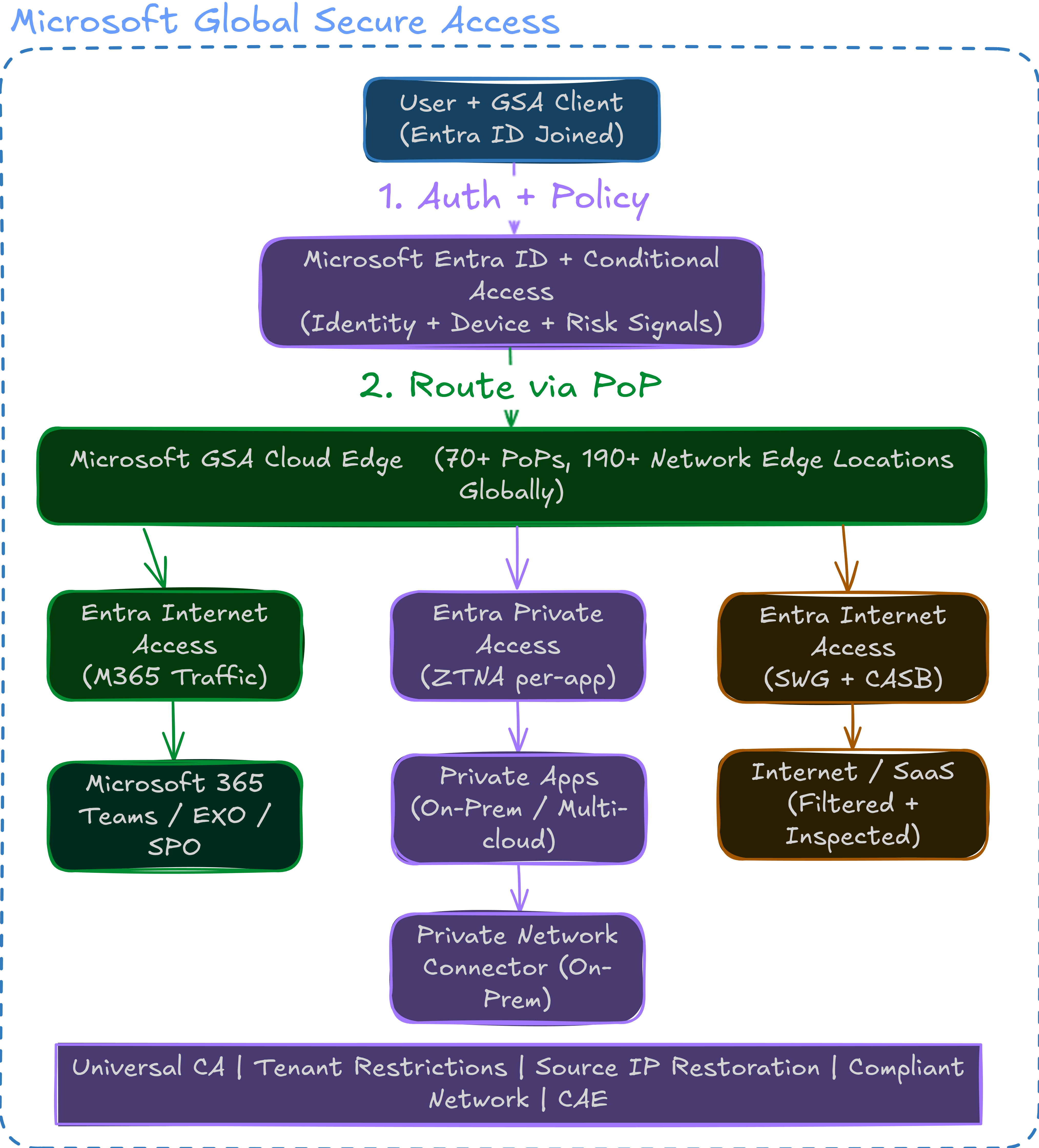
What made GSA interesting to me wasn't that it's another SWG or VPN in Azure. It's how tightly it's wired into Entra ID. The same Conditional Access policies that protect your Microsoft 365 apps now extend to your private applications and your internet traffic. Your identity becomes your network perimeter. That's the pitch, anyway, and it's also where the attack surface gets interesting.
The three traffic profiles
GSA sorts traffic into three forwarding profiles. Each type of traffic gets its own set of rules.
1. Microsoft Traffic Profile
This is the first profile, and probably the one most organizations should turn on even if they never touch Private Access or Internet Access.
The Microsoft Traffic Profile routes Microsoft 365 traffic (Exchange Online, SharePoint, Teams, and so on) through the GSA tunnel. There are two main reasons to do this.
Source IP restoration. When traffic goes through any cloud proxy, the destination service stops seeing the user's real IP and instead sees the proxy's egress IP. That's normally fine, but it quietly breaks anything that depends on knowing where the user actually is: IP-based Conditional Access named locations stop matching, Entra ID Protection risk signals like impossible travel get noisier, and your sign-in logs show a Microsoft edge IP instead of the user's location. Source IP restoration fixes this by having the GSA edge signal the original client egress IP back to Entra ID and Microsoft Graph out-of-band, so the identity plane still sees the true source IP even though the packets came out of Microsoft's infrastructure. The result: your sign-in logs show real location data instead of a VPN exit node somewhere in Virginia, and your IP-based policies keep working. There's a good write-up on this in Why you should enable the Microsoft Traffic Forwarding Profile.
Universal tenant restrictions. Tenant Restrictions v2 (TRv2) lets you stop users from signing into tenants you don't control — personal Microsoft accounts, a competitor's tenant, a partner org someone shouldn't be touching from a corporate device. The classic way to enforce this is a corporate proxy that injects special HTTP headers into outbound authentication traffic, which means you need a proxy on the path and a way to manage it on every device. GSA moves that enforcement into the tunnel: it tags outbound auth traffic with the tenant restriction headers at the network level, so the check follows the user wherever they are, with no browser extension and no MDM-managed proxy config to maintain.
The nice part is that this profile doesn't need Private Network Connectors, doesn't need licenses beyond what most organizations already have, and doesn't require a full GSA rollout.
2. Private Access Profile
This profile handles traffic bound for your internal, private applications. You define which apps and which IP ranges or FQDNs should go through the tunnel. Traffic leaves the user's device, runs through the GSA tunnel to Microsoft's edge, and then reaches the internal application through Private Network Connectors deployed in your environment.
It's a modern, identity-aware, per-app VPN, except the tunnel terminates at Microsoft's edge and your connectors handle the last mile.
The DNS and SSO complexity here is worth understanding before you deploy. Deep Dive DNS in Entra Private Access walks through DNS resolution, the split-DNS challenges, and the production gotchas, and Deep Dive SSO in Entra Private Access covers how single sign-on works when your traffic is proxied through Microsoft's cloud.
App Proxy isn't dead, but Private Access is clearly the direction Microsoft is heading (more on that here).
3. Internet Access Profile
This profile handles general internet traffic, and it's where the SWG features live: URL filtering, content categorization, malware scanning. Traffic goes from the device through the GSA tunnel to Microsoft's edge, gets inspected and filtered, then heads out to the internet.
This is where GSA goes up against Zscaler, Netskope, and Palo Alto's Prisma Access.
The GSA client
All of this needs something on the device. Microsoft ships the Global Secure Access client, a lightweight agent that runs on the endpoint. At the time of my research it was available for Windows, macOS, iOS, and Android. The Windows client is the most mature and the one I reversed, so that's what I'll focus on.
One design choice is worth calling out up front. Most SSE and VPN clients install a virtual network adapter and become the default route for the machine, which is why you can usually only run one at a time — they fight over who owns the traffic. GSA takes a different approach: instead of a virtual adapter, it uses a lightweight filter (LWF) driver that sits in the network stack and selectively picks off only the flows that match a forwarding profile, leaving everything else alone. The practical upshot is that GSA can coexist with an existing VPN or another SSE client on the same device, and it also means the client is making per-flow capture decisions in the kernel rather than blindly tunneling everything. That per-flow decision logic is exactly what makes the client interesting to reverse.
The Windows client isn't a single binary. It's a set of components:
| Component | What it does |
|---|---|
| GlobalSecureAccessDriver.sys | Kernel-mode driver hooked into Windows Filtering Platform (WFP) and NDIS. The traffic interceptor. Decides which packets get tunneled and which don't. |
| GlobalSecureAccessEngineService.exe | The brain. Evaluates forwarding policies, makes channeling decisions, and coordinates between the driver and the tunneling service. |
| GlobalSecureAccessTunnelingService.exe | Establishes and manages the gRPC tunnel to Microsoft's edge servers. Where the encrypted tunnel actually lives. |
| GlobalSecureAccessForwardingProfileService.exe | Polls Microsoft's Azure Policy Service (APS) for forwarding profiles and hands them to the other components. |
| GlobalSecureAccessClientManagerService.exe | Health monitoring, auto-updates, lifecycle management. |
| GlobalSecureAccessTray.exe | The system tray icon. Shows connection status. |
| GlobalSecureAccessETLController.exe | Telemetry collection and shipping to Microsoft's OneCollector/1DS infrastructure. |
That's six user-mode binaries and one kernel driver working together. Most of the interprocess communication between them runs over ALPC (Advanced Local Procedure Call), a Windows kernel IPC mechanism. I'll go deep on this in Part 2.
The client installs as a set of Windows services that start at boot. It registers WFP callouts in the kernel to intercept outbound connections, checks them against the active forwarding profiles, and either lets them through normally or redirects them into the gRPC tunnel.
How traffic flows through GSA
Here's what happens when a user on a GSA-enrolled device tries to reach an internal application through Private Access:
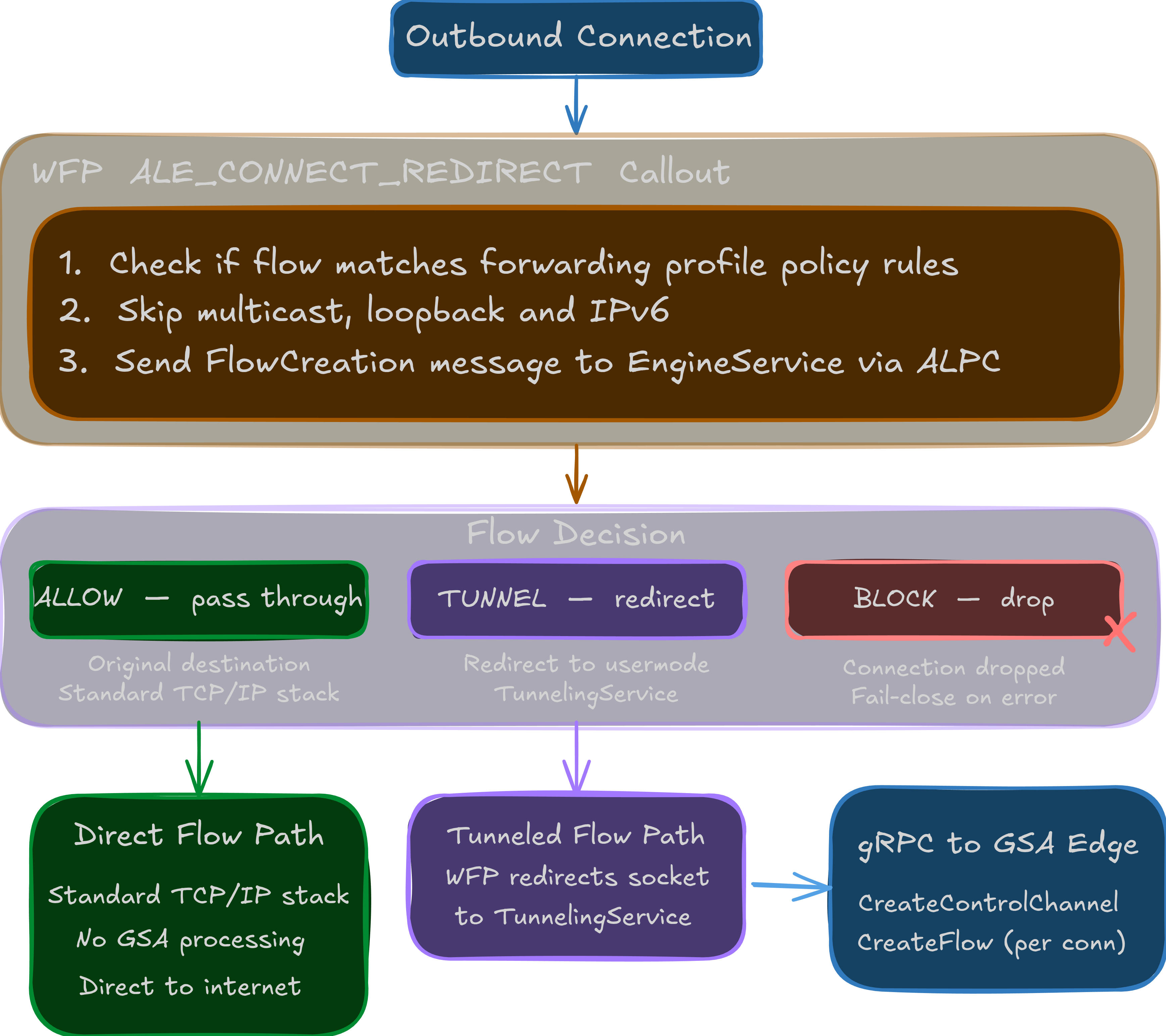
The flow looks like this:
1. User opens browser → navigates to internal-app.corp.contoso.com

2. DNS request fires → GSA driver intercepts it via WFP
   → Checks against Private DNS rules
   → If matched: resolves to a synthetic IP (e.g., 6.6.x.x range)

3. Application sends TCP SYN to the synthetic IP
   → WFP callout intercepts at ALE_CONNECT_REDIRECT layer
   → Driver queries EngineService via ALPC: "Should this flow be tunneled?"

4. EngineService evaluates the flow against active channeling rules:
   → Checks forwarding profile (Private Access, Internet Access, Microsoft Traffic)
   → Checks app ID, FQDN, IP ranges, port
   → Returns verdict: TUNNEL or BYPASS

5. If TUNNEL:
   → Driver redirects the connection to the TunnelingService
   → TunnelingService opens a gRPC bidirectional stream (CreateFlow RPC)
     to the GSA edge server ({tenant}.private.client.globalsecureaccess.microsoft.com:443)
   → Authenticates with JWT tokens
   → Packets flow: Device → gRPC tunnel → Microsoft Edge → Private Network Connector → Internal App

6. Response comes back the same path in reverse.
A couple of things in that flow are worth pausing on.
The synthetic IP in step 2 is a small trick that makes the whole thing work. Your internal app internal-app.corp.contoso.com has no public DNS record, and the client can't resolve it the normal way because it isn't on that network yet. So when the GSA driver sees a DNS query that matches a Private Access rule, it doesn't forward the query to a real DNS server — it hands back a made-up address from a reserved range (the 6.6.x.x block, which isn't routable on the public internet). That synthetic IP is really just a handle. When the application then connects to it, the driver recognizes the address it invented, knows exactly which FQDN and which private app it stands for, and tunnels the connection accordingly. The real name resolution happens on the far side, at the connector. This is also how GSA does split-DNS: only names that match a rule get a synthetic IP; everything else resolves normally and goes straight out.
The second thing: the whole tunnel rides standard TLS over HTTP/2 (gRPC). From the network's point of view, all you see is an outbound HTTPS connection to *.globalsecureaccess.microsoft.com:443. No custom protocol, no odd ports, no VPN headers. Just gRPC over TLS, and it looks completely legitimate. That detail matters later.
The compliant network check
One of GSA's headline features is the compliant network check. The idea is simple: you write a Conditional Access policy that says "only allow access to this resource if the user is connecting through a compliant network," meaning they have to be behind the GSA tunnel.
It's pitched as a defense against token theft and replay, which is one of the hardest problems in identity security today. Phishing-resistant MFA stops an attacker from authenticating as you, but it does nothing once a valid token already exists on a compromised machine. Infostealer malware and adversary-in-the-middle phishing kits both work by grabbing the tokens after sign-in and replaying them from the attacker's own infrastructure. The compliant network check is meant to break that replay: even with a stolen token, the attacker can't satisfy the policy unless they're also inside your GSA tunnel.
Enforcement happens in two places. Authentication-plane enforcement runs at sign-in time: when someone tries to redeem a refresh token for a new access token, Entra ID checks whether the request is arriving through your tenant's compliant network, and denies it if not. Data-plane enforcement covers tokens that were already issued, working with services that support Continuous Access Evaluation (CAE), such as Microsoft Graph. With CAE, a stolen access token replayed from outside the compliant network gets rejected by the resource in near-real time; without it, a stolen access token stays valid for its full lifetime (typically 60 to 90 minutes).
One important detail: the compliant network check is bound to your specific tenant. A Conditional Access policy in contoso.com is only satisfied by users coming through Contoso's GSA tunnel — someone connected through fabrikam.com's GSA tunnel can't pass it, even though they're also "on a compliant network" in the generic sense. That tenant binding is what makes the control meaningful, and it's also the part I spent a lot of time looking at. It's different from a named-location or IP-range check too: admins don't maintain any list of egress IPs, and there's no need to hairpin traffic through a corporate VPN to anchor a source IP.

In theory this is strong. Even if someone grabs your tokens, they can't use them unless they're also going through GSA. The catch is in how "compliant network" is actually validated, and I'll get into that in Part 3.
If you want to see how GSA plugs into the policy engine, Global Secure Access in Conditional Access is a good reference.
Intelligent Local Access (ILA)
A common headache with ZTNA: what if the user is already on the corporate network? If they're sitting in the office on the LAN, there's no point routing their traffic all the way out to Microsoft's cloud and back through a connector just to reach a server three racks over.
GSA handles this with Intelligent Local Access (ILA). When the client sees that the target resource is on a local subnet, it can prefer the direct local route instead of tunneling, avoiding the round trip through the cloud.
There's a thorough Intelligent Local Access Deep Dive if you want the full picture. The gist: ILA watches local network state, detects subnet changes, and switches between local and tunneled routing on the fly. It's a nice quality-of-life feature, but as we'll see in Part 2, the implementation has some quirks worth a security look.
Private Network Connectors
For Private Access to work, you deploy Private Network Connectors in your environment. These are lightweight Windows services running on a server that can reach your internal applications. They open an outbound connection to Microsoft's cloud and bridge the GSA tunnel to your internal network.

If you've used Azure AD App Proxy connectors, these are the same idea with a new name and more capability. They support TCP and UDP (App Proxy was HTTP/HTTPS only) and can handle arbitrary protocols.
You deploy them in connector groups, assign applications to those groups, and the connector handles last-mile connectivity. The key architectural point — and the thing that trips people up the first time they see it — is that connectors make outbound connections only. The connector dials out to Microsoft's cloud and holds that connection open; when a user's tunneled traffic arrives at the edge, Microsoft pushes it down the already-established connector connection rather than opening anything inbound. So traffic reaches an internal server that has no public exposure at all, without a single inbound firewall rule, a published port, or a change to your DMZ. Compare that to the old VPN-concentrator or reverse-proxy model, where you punch a hole in the perimeter and hope it's locked down. Deploy a few connectors for redundancy and the group load-balances and fails over across them.
Licensing
Licensing is its own puzzle, so let me try to make it readable.
Prerequisites
You need Microsoft Entra ID P1 at minimum. GSA doesn't run on free or Office 365 plans. If your organization is on Microsoft 365 E3, A3, E5, A5, or similar, you already have P1 or P2 included, so this usually isn't a blocker.
The GSA licenses
| Product | Standalone price | What you get |
|---|---|---|
| Microsoft Entra Internet Access | $5/user/month | SWG, URL filtering, malware protection for internet traffic |
| Microsoft Entra Private Access | $5/user/month | ZTNA, per-app access to internal resources |
| Microsoft Traffic Profile | Included with Entra ID P1 | M365 traffic routing, source IP restoration, basic tenant restrictions |
So the Microsoft Traffic Profile, arguably the most immediately useful feature, is effectively free if you already have P1. For the full Internet Access and Private Access features, you're looking at $5/user/month each, or $10 for both.
The bundle: Microsoft Entra Suite
If you're going all-in, Microsoft offers the Microsoft Entra Suite at $12/user/month, bundling:
- Entra ID P1 (or a $9/user/month add-on for P2 customers)
- Entra ID Protection
- Entra ID Governance
- Entra Internet Access
- Entra Private Access
- Entra Verified ID (premium)
Whether the suite makes sense depends on how many of those you'd buy separately anyway. If you already have P2 and want both Internet Access and Private Access, the math starts to work.
Guest users
This one catches people out. There's a good breakdown of cross-tenant scenarios, and Microsoft has dedicated docs on guest user licensing for GSA. The short version: guest access has its own licensing implications and B2B scenarios need planning. The ForwardingProfileService in the client actually has specific logic for detecting B2B scenarios and filtering policies accordingly, something I found during reversing that comes up again in Part 2.
My take
Compared to Zscaler, Netskope, and Palo Alto Prisma Access, Microsoft's pricing is aggressive. $5/user/month for ZTNA that's deeply integrated with Entra ID is competitive, especially since most enterprise customers already have the P1 prerequisite. But the real advantage isn't price, it's the integration. No other SSE vendor can say "your Conditional Access policies just work across internet and private traffic." That tight coupling with the identity plane is both GSA's biggest strength.
Why this caught my eye
So why spend five months on this particular product?
A few reasons.
It sits at a strange intersection. GSA is a networking product controlled by an identity platform, enforced by a kernel driver, talking a proprietary gRPC protocol to Microsoft's global edge. That's an attack surface spanning user mode, kernel mode, cloud APIs, and network protocols.
The security claims are bold. "Compliant network" implies device-level trust. "Zero Trust Network Access" implies per-request verification. Strong promises, and I wanted to see whether the implementation lived up to them.
It's being rolled out everywhere. As organizations move off traditional VPNs, GSA is becoming the default for Microsoft-centric environments, so any security issues here have real reach.
And at the time, there was almost no public security research on GSA's internals. Plenty of deployment guides and marketing, but nothing on how the client actually works. Nobody had reversed the protocol, looked at the driver, or questioned the architecture. That's exactly the kind of gap I find hard to leave alone.
What's next
This is Part 1 of a three-part series:
- Part 1 (this post): what GSA is, how it works, how it's licensed, and why I decided to take it apart.
- Part 2 — Under the Hood: the reverse engineering deep dive. The kernel driver, the ALPC IPC and the gRPC protocol reconstruction.
- Part 3 — The Rogue Client: building a Linux GSA tunnel client from scratch using only the reversed protocol. How tokens can be extracted and abused, how the "compliant network" promise falls apart, and the full kill chain from initial access to corporate network access through the victim's own ZTNA infrastructure.
If you want GSA from the defender's side, I can't recommend Chris Brumm's blog series enough. His Overview to Global Secure Access is the best starting point I've found, and his deep dives on DNS, SSO, Conditional Access, and Intelligent Local Access are all worth your time.
Where Chris's work explains how GSA is meant to work, mine looks at what happens when you start pulling on the threads. And there are a lot of threads to pull.
See you in Part 2.